Docs Build your own
Connect your systems
Every service has a link and keys. Your apps and systems call it with the header they already know how to send.
- Create a key for the serviceOn the service page. It is shown only once, and can be revoked at any time.
- Your system calls the linkWith the key in the header it already knows how to send, and the file or the data in the request.
- The devices do the workThe orchestrator splits it and the free devices pick up the parts.
- The answer comes backRight away, if it is quick, or later: your system follows the request, or gets a signed notice when it ends.
Every service, built with AI, with code or ready-made, can be used by people on its page and by other systems through its link. Your ERP, your app, your site or another service can call it.
The key
- Created on the service page, with a name that says who uses it (“Finance ERP”, “Field app”).
- Shown only once. After that, only its beginning is shown, with the last time it was used.
- Revocable at any time, one by one, without touching the others.
- Kept only as a fingerprint. Not even we can read a key back.
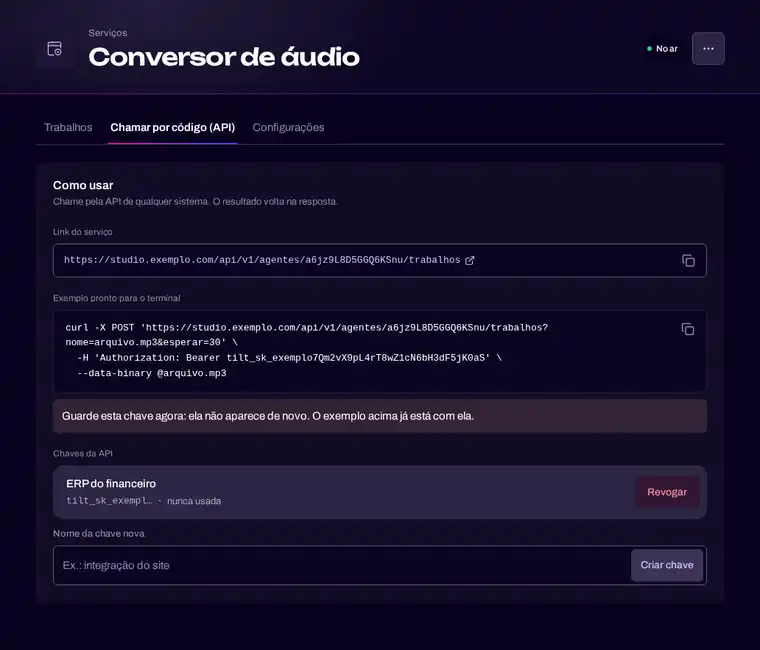
The header your system already sends
Many systems only know how to send a key one way. The service accepts the most common ones:
- the key as a bearer token, in the authorization header;
- the key in an API key header;
- the key as user or password in basic authentication;
- for functions, a header with the name you choose.
Now, or later
- Short work answers right away, with the result in the response.
- Longer work is accepted at once, and your system follows the request or gets the result when it is ready.
- A signed notice can be sent to your system when the work ends, so it does not need to keep asking.
- A repeated request does not run twice, and every request has a limit for how long it is still worth doing.
The exact call, with the real address and examples, is on each service’s page, ready to copy.